The short answer
The best lead generation tool for most small B2B teams is Wiza, because it verifies contacts when you request them and only charges for valid emails. But no single tool does every job, and most lists compare products that were never competing with each other.
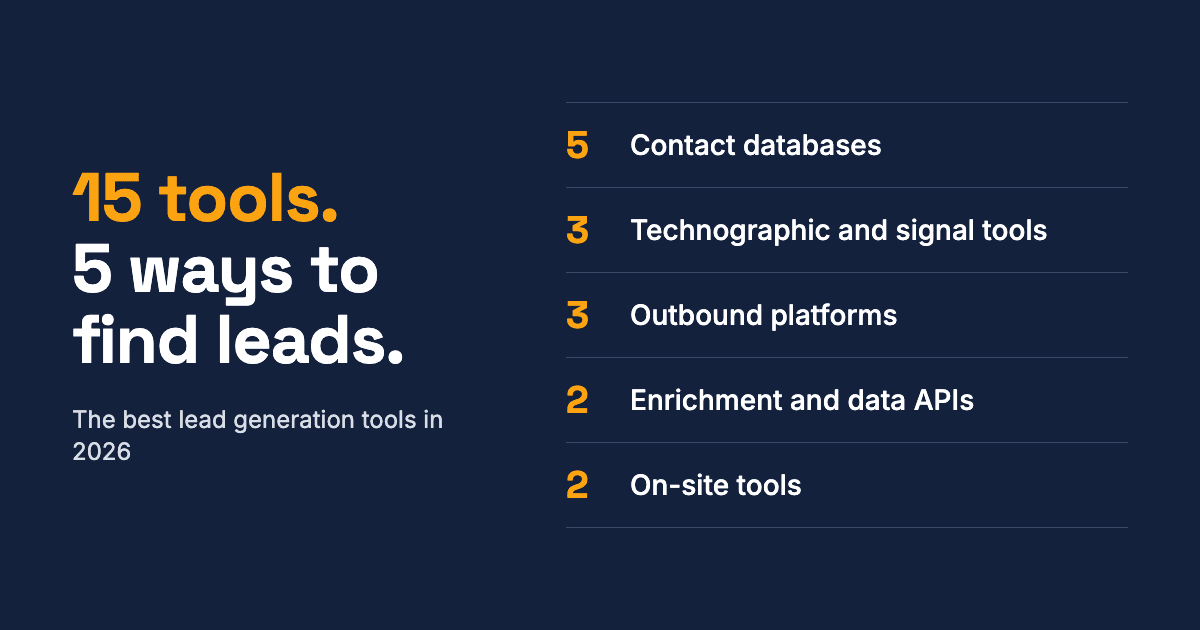
A contact database, a cold email sender and a website popup all get called "lead generation tools". So this guide sorts them by how they find leads, then names the best pick for each job.
- Need verified emails and phone numbers: Wiza
- Need enterprise-grade US data: ZoomInfo
- Filling gaps in a target list: FullEnrich
- Want a list of companies using a specific technology: TechPeeker (our product) or BuiltWith
- Sending cold email at volume: Instantly or Smartlead
- Combining several data sources: Clay
- Building your own product on live B2B data: Crustdata
- Putting names on your website visitors: RB2B
All 15 tools at a glance
Starting prices are in US dollars. Annual billing is noted where it's the lowest price shown.
| Tool | Job | Starting price | Free option | Best for |
|---|---|---|---|---|
| Wiza | Contact database | $49/user/mo | 20 emails and 5 phone numbers | Small B2B teams |
| ZoomInfo | Contact database | About $14,995/yr (reported) | No self-serve trial | US enterprise sales |
| FullEnrich | Waterfall enrichment | $29/mo | Free trial, 50 credits | Filling gaps in a target list |
| Lusha | Contact database | About $49/user/mo | Free tier | Quick one-off lookups |
| Hunter | Email finder | $34/mo, billed annually | 50 credits a month | Finding emails cheaply |
| TechPeeker | Technographic lists | $99/mo | Free lookups and free trial | Lists of sites by technology |
| BuiltWith | Technographic lists | $295/mo | Free lookups | Deep history and coverage |
| TheirStack | Hiring signals | $49/mo | Free tier | Backend technology signals |
| Instantly | Cold email | $47/mo, sending only | None confirmed | Flat-fee sending |
| Smartlead | Cold email | $39/mo | Free trial | Sending plus verified prospects |
| Lemlist | Multichannel outreach | $69/mo, email plan | 14-day trial | Email plus LinkedIn |
| Clay | Enrichment workflows | $185/mo | 100 data credits a month | Combining data providers |
| Crustdata | B2B data API | Credit packs, price not listed | $20 in free credits | Building on live B2B data |
| RB2B | Website visitor ID | $79/mo | Free plan, company-level only | Naming US website visitors |
| Leadfeeder | Website visitor ID | $79/mo, billed annually | Free Lite plan | Seeing which companies visit |
How we chose
We judged each tool on one question: what does it cost to get a usable lead from this type of tool? That means looking at the published price, the credit or seat limits behind it, and the type of data it actually returns.
Prices come from vendor pages or published price checks from September to November 2026. Where a vendor publishes no price, we show reported contract figures and say so. Check the vendor's page before you buy, because credit-based pricing changes often.
Disclosure: TechPeeker is our product, and it appears in this list. We placed it in its category rather than at the top, and we list what it doesn't do. We have not run a head-to-head accuracy test across these tools.
Contact databases: when you need a person to email or call
Contact databases sell names, job titles, emails and phone numbers. Start here if you know who you want to reach but don't have their details.
1. Wiza
Wiza is the best starting point for small teams that care most about data quality. It verifies contact details the moment you request them, and you only pay for valid emails. Starter costs $49 per user a month with 100 valid emails and 100 phone numbers.
What you get: prospect search and filters, saved lists, CSV export, CRM sync, a Chrome extension and built-in email verification. Wiza claims 850 million-plus contacts and deliverability above 99%.
Plans: Email costs $99 per user a month for 500 valid emails, and Email + Phone costs $199 for 500 of each. Annual plans cost $83 and $166 a month with unlimited reveals, but bulk exports are capped at 2,500 a month. The free plan includes 20 valid emails and 5 phone numbers.
- Best for: small sales and recruiting teams that want verified emails and mobile numbers
- Watch out for: extra emails cost $0.15 and extra phone numbers cost $0.35 on monthly plans, unused credits don't roll over, and it doesn't send email
2. ZoomInfo
ZoomInfo is the enterprise choice for US data, with 420 million-plus contacts on its sales page. It publishes no list price. Vendr reports a median deal near $31,875 a year, and the entry tier is reported at around $14,995 with a 3-seat minimum.
What you get: contact and company data, org charts and intent signals. Its sales page also lists 145 million-plus companies and 174 million-plus verified emails. It's sold as platform access rather than on a credit meter.
Plans: Pricing is quote-only, with estimates of roughly $4,000 to $7,500 per user each year. G2 reviewers also flag thinner mobile coverage in DACH, the Nordics and the UK.
- Best for: larger US-focused sales teams that also want intent data
- Watch out for: annual-only contracts and no self-serve trial
3. FullEnrich
FullEnrich checks many data providers in sequence, so one provider's gaps matter less. This approach is called waterfall enrichment. Plans start at $29 a month for 500 credits.
What you get: verified work emails, personal emails and mobile numbers drawn from 15-plus providers. The vendor reports an average email find rate of about 80%. You're only charged when data is found and verified, and every plan includes unlimited users.
Plans: The free trial includes 50 credits with no card required. Self-serve plans scale up to $3,500 a month for 100,000 credits. A work email costs 1 credit and a mobile number costs 10.
- Best for: teams that already have a target list and want more of it filled in
- Watch out for: phone numbers cost 10 times as much as emails, and there's no built-in outreach
4. Lusha
Lusha is the simplest way to reveal contact details one at a time. It starts at about $49 per user per month and has a free tier.
What you get: one-click contact reveals, strong mobile coverage and GDPR-aligned data. Its database is narrower than the larger platforms.
Plans: Costs grow with seats and credits. SpendHound reports average spend of $4,519 a year for companies with 50 to 1,000 employees, based on real customer contracts.
- Best for: individual reps who prospect on LinkedIn and want quick lookups
- Watch out for: limited search filters and credit caps make it weak for building large lists
5. Hunter
Hunter is the budget option when you only need email addresses. The free plan gives 50 credits a month, and Starter costs $34 a month billed yearly with 2,000 credits a month.
What you get: an email finder, an email verifier and basic email sequences. A find costs 1 credit, a verification costs 0.5, and credits are shared across unlimited users.
Plans: Starter includes 3 mailboxes. Growth costs $104 a month billed yearly, with 10,000 credits a month and 10 mailboxes. Extra mailboxes cost $10 a month.
- Best for: founders and small teams who already know which companies to contact
- Watch out for: it's a poor fit if you also need phone numbers
Technographic and signal tools: when you need the right companies
These tools find companies by the software they use or are hiring for. Use them when your best customers share a technology, such as every Shopify store running Klaviyo. Read our guide to technographic data if the term is new.
Most of them give you companies rather than people, so pair them with a contact database.
6. TechPeeker
TechPeeker builds exportable lists of websites by technology, covering 17M+ websites and 800+ technologies. Starter costs $99 a month or $980 a year, with unlimited technology lists and unlimited leads per export. Business adds bulk lookup and 25,000 API requests a month for $149.
What you get: technology lists, keyword searches, advanced filtering and exports with no cap on leads. Five free single-site tools need no account: Website Technology Checker, CMS Detector, Shopify Theme Detector, Shopify App Detector and WordPress Theme Detector.
Plans: Enterprise is custom-priced and adds multiple seats, bulk data purchase and a dedicated account manager. CRM connections run through the API and need setup, and there's no browser extension.
- Best for: agencies and SaaS teams that want large website lists at a flat price
- Watch out for: no contact data, no spend estimates, no historical trends, and one seat on self-serve plans
7. BuiltWith
BuiltWith is the deepest option, with about 127,780 technologies, 492 million domains and 18+ years of history. Basic costs $295 a month and is limited to two technology lists. See our BuiltWith alternatives guide for cheaper options.
What you get: technology lists, spend and revenue estimates, and names, titles and emails where public. It also has native connections to Salesforce, HubSpot, Dynamics 365, Pardot, Zoho and Close.
Plans: Pro costs $495 a month with unlimited lists, and Team costs $995 with unlimited seats. API access is credit-based and available from the $295 plan.
- Best for: market research and teams that need historical adoption data
- Watch out for: detection is limited to what a website exposes, which is true of every website scanner in this section
8. TheirStack
TheirStack reads job postings instead of website code, so it can surface backend tools such as databases and DevOps software. It has a free tier, and paid plans start at $49 a month.
What you get: technology and hiring data drawn from millions of job postings worldwide. Hiring can happen before a tool goes live, so it can work as an earlier buying signal than a website scan.
Plans: The free tier needs no credit card, and one-time credit purchases are available if you don't want a subscription.
- Best for: selling developer tools or infrastructure that never appears on a website
- Watch out for: by its own account, coverage is thinner for small teams and companies that aren't hiring
Outbound platforms: when you already have a list
Outbound platforms send the emails and manage the follow-ups. Check whether a plan includes lead data, because several sell it separately.
9. Instantly
Instantly charges a flat fee instead of per seat. Outreach Growth costs $47 a month, or $37.60 on yearly billing, with unlimited email accounts and warmup.
What you get: campaign sending from as many email accounts as you connect, with automated warmup included. The lead database is a separate product with its own checkout.
Plans: Hypergrowth costs $97 a month and raises the limit to 25,000 uploaded contacts. The entry database plan includes 1,500 credits.
- Best for: teams running many mailboxes who don't want seat fees
- Watch out for: the entry plan caps you at 5,000 emails a month and has no lead database, and the bundle with data starts at $94
10. Smartlead
Smartlead has the lowest entry price of the three. Base costs $39 a month, or $32 billed annually, with 6,000 sends and 2,000 verified prospect emails a month.
What you get: unlimited email accounts on every plan and a monthly quota of verified prospect emails. Plans have no lock-in contract, and email verification is a paid add-on.
Plans: Pro costs $94 a month for 90,000 sends and 30,000 prospect emails. Unlimited Smart costs $174 for 150,000 sends and 50,000 prospect emails. Unlimited Prime costs $379 for 500,000 sends and 170,000 prospect emails.
- Best for: agencies and small teams that want sending and some prospect data on one plan
- Watch out for: it describes its own data as shallower than ZoomInfo's for enterprise accounts
11. Lemlist
Lemlist is the pick when LinkedIn is part of your sequence. The email plan costs $69 a month for unlimited users, and it includes access to a database of 650 million-plus leads.
What you get: email sequences and a built-in lead database, with LinkedIn steps on the higher plan. The email plan covers 50,000 emails a month and unlimited senders.
Plans: Annual billing cuts the email plan to $55 a month. Multichannel costs $87 per user billed yearly, with 5 senders per user. A data pack costs $75 a month billed yearly for 10,000 credits, enough for 2,000 emails or 500 phone numbers. There's a 14-day trial with no card required.
- Best for: teams combining email with LinkedIn steps
- Watch out for: LinkedIn automation needs the Multichannel plan at $109 per user a month, and lead data is sold in credit packs
Enrichment and data APIs: when one data source isn't enough
Enrichment tools chain several data providers together to fill in missing details. They reward technical users and punish teams without a clear process. Data APIs feed those same records straight into your own software.
12. Clay
Clay is the leading workflow tool for this job. It has a free plan with 100 data credits and 500 actions a month, and Launch starts at $185 a month, or $167 billed annually.
What you get: workflows that pull from third-party data providers, with unlimited seats on every plan. Launch includes 2,500 data credits and 15,000 actions a month, plus phone number enrichment and job change tracking.
Plans: Growth includes 6,000 data credits and 40,000 actions a month, and prices rise as you add more of either. Annual billing saves 10%. The free plan is capped at 200 rows and has no phone data.
A common workflow is to export companies from a technographic tool, then use Clay to find and verify the right person at each one.
- Best for: growth teams that want custom lead lists from several sources
- Watch out for: CRM sync, HTTP API access and webhooks start on Growth, at $495 a month
13. Crustdata
Crustdata is the pick for teams building their own product on live B2B data. It sells people and company data through an API and an MCP server for AI agents, and says it covers more than 1 billion people.
What you get: company and people search, enrichment, job posting and social post data, plus watchers that alert you to changes at a company or person. You can also buy full datasets.
Plans: New accounts get $20 in free credits, then self-serve teams buy credit packs that last 12 months. Enterprise plans start at four figures a month. A people search costs 0.03 credits per result, and a basic people enrichment costs 1 credit, with a work email adding 1 more.
- Best for: developers building sales tools, AI SDRs, or recruiting and investor products
- Watch out for: it's built for developers, and the pricing page doesn't show what a credit costs in dollars, so test on the free credits before committing
On-site tools: when leads are already visiting your website
On-site tools identify people who have already found you. Add them once you have steady traffic, since they can't create demand on their own.
14. RB2B
RB2B puts names on individual US visitors to your website and sends them to Slack. Starter costs $79 a month for 300 identified visitors.
What you get: named US visitors with LinkedIn profile links, delivered to Slack as they arrive. Company-level identification works worldwide.
Plans: The free plan covers 150 identified visitors a month, at company level only. Pro costs $149 and adds business emails and all integrations. Pro+ costs $199 and adds premium resolution. Paid plans include a 7-day trial.
- Best for: B2B sites with steady US traffic and a sales team that lives in Slack
- Watch out for: person-level identification is US-only, and RB2B's own coverage figure is 15% to 45% of visitors, depending on plan
15. Leadfeeder
Leadfeeder shows which companies visit your website. The free Lite plan covers up to 100 companies from the last 7 days, and Discover costs $79 a month billed annually.
What you get: company-level identification of your website visitors. Identifying a company costs no credits, while revealing an email costs 0.2 credits and an email plus phone costs 1.
Plans: Discover covers up to 1,000 companies. Activate costs $369 a month billed annually, with up to 4,000 companies and 200 credits. Scale costs $599 with up to 10,000 companies. There's a 14-day trial with no card required.
- Best for: B2B sites with enough traffic to reveal real accounts
- Watch out for: Discover only identifies companies, and CRM automations start on the $369 Activate plan
How to choose your stack
Buy for the step you're missing, not the longest feature list. If you can't name your target accounts, a technographic list comes first. If you have accounts but no contacts, buy a contact database. If you have both, buy a sender.
These starter stacks use the entry prices above, so real costs will rise with seats and credits.
| Your situation | Stack | Starting cost per month |
|---|---|---|
| Solo founder on a tight budget | Hunter Starter + Smartlead Base | $73 |
| Small team with one rep | Wiza Starter + Smartlead Base | $88 |
| Selling to users of a specific technology | TechPeeker Starter + Wiza Starter | $148 |
| Inbound-led site with US traffic | RB2B Starter | $79 |
| Growth team running custom outbound | TechPeeker Starter + Clay Launch + Smartlead Pro | $378 |
For a deeper walkthrough of list building, see how to generate B2B leads by technology stack.
FAQ
What is a lead generation tool?
It's software that helps you find, capture or contact potential customers. The category covers contact databases, technographic lists, email senders, enrichment tools and website forms.
What is the best free lead generation tool?
Hunter's free plan is the most useful for ongoing email lookups, with 50 credits a month. Wiza's free plan gives you 20 valid emails and 5 phone numbers to test, and Clay's suits testing enrichment workflows.
Do I need more than one tool?
Usually, once you scale. Most teams need a way to pick accounts, a way to find contacts and a way to send messages. Smartlead covers the last two for small teams.
How do I find companies using a specific technology?
Use a technographic tool. BuiltWith and TechPeeker detect technologies from website code, while TheirStack uses job postings. Compare technographic data providers to see which fits.
Ready to build a list by technology?
Check what any website runs for free, or see TechPeeker's plans if you need full lists.